
Blober vs rclone for Proton Drive and Proton Photos
· 6 min read · Updated
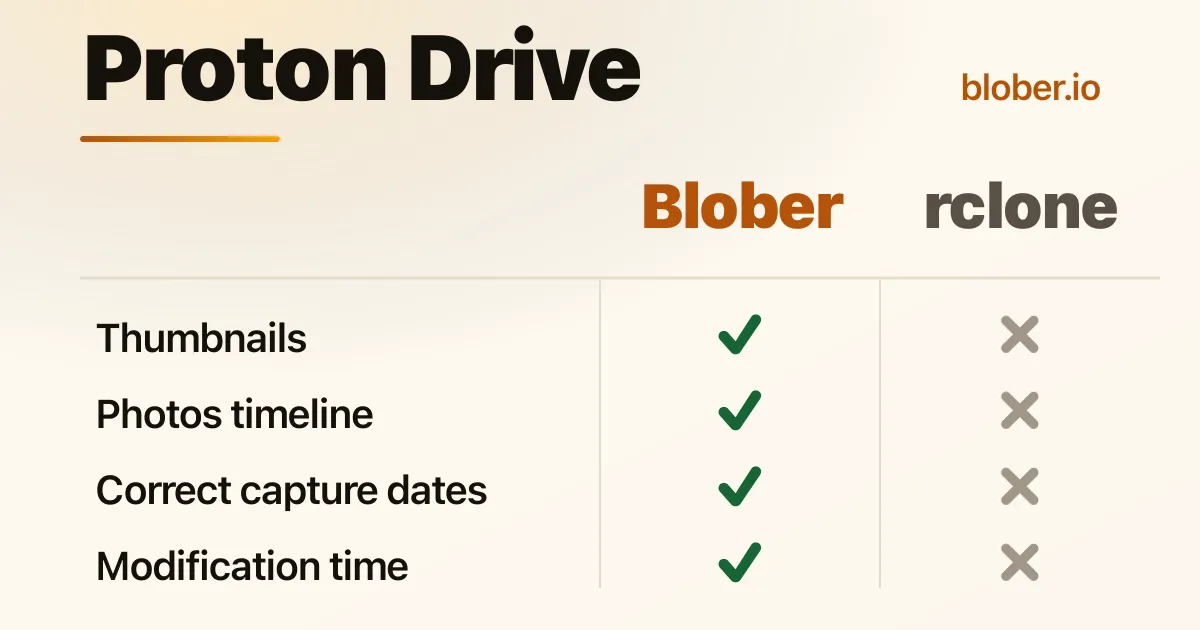
If rclone already moves your other clouds around, adding Proton Drive looks like the obvious next step. It is a real rclone backend, open source, and it does a good job with scheduled jobs and mounts. Photos and videos are where it falls short.
You back up a camera roll with rclone, then open Proton expecting the Photos tab to be full. The files are there, but as a folder in My Files full of generic file icons, and the Photos timeline is empty.
People describe it plainly:
Uploading images via rclone results in generic file icons instead of visual thumbnails inside the Proton Drive interface.
That line comes from a thread where a NAS owner set up rclone with Proton Drive and asked why nothing looked like a photo[1]. The cause is on the upload side: Proton's photo features depend on extra data that a general file mover never sends.
Both Blober and rclone use Proton's own encryption, so privacy is the same either way. What differs is what survives the upload: thumbnails, capture dates, and which surface the media ends up on. For a photo library, those decide whether the result is usable.
Proton Drive is end to end encrypted, so Proton's servers never see the inside of your files. They cannot generate a preview from the original, because nothing is decrypted until it reaches your device.
That leaves the uploader to make the thumbnails. Proton's own apps decode each image or video on your device, build the small preview images, encrypt them, and store them beside the original[2]. The interface renders those extra blocks as a tile or a preview.
rclone's Proton backend only speaks the file side of the API. It uploads the original with no thumbnail blocks. On the rclone issue tracker this is a known missing feature: the client would have to generate the preview and upload it for the file to display one[3]. With nothing else to render, Proton shows a generic icon.
You cannot fix this afterwards. Proton Drive has no option to set or replace a thumbnail on a file that is already uploaded, and its servers cannot generate one after the fact. To get a preview you have to upload the file again with a client that sends thumbnails, so the tool you pick on day one decides what your library looks like from then on.
Blober uploads the same thumbnail data Proton's own clients do. Before an upload it decodes the media, produces Proton's standard preview sizes, and sends them with the original. Images and videos show real previews in My Files, and photos get a proper tile in the Photos timeline. Audio gets a thumbnail too: Blober reads a music file's embedded album art (the cover on an mp3 or m4a) straight off the file and uploads it as the thumbnail, so the track shows its cover.
Proton Photos orders the timeline by each photo's capture time. That value comes from the photo's EXIF data and is set when the file is uploaded. A photo uploaded without it has no real capture date, so it lands wherever its upload time puts it.
The rclone backend documentation states the underlying gap directly: the backend does not support updating modification times yet[4]. rclone treats photos as files, and a few years of pictures migrated that way end up in a timeline grouped by upload date.
Blober reads the EXIF capture time and sends it to Proton with the upload, and it carries over the file's own dates from the source. Photos group under the day they were taken.
Proton keeps two surfaces under one login: My Files, a folder tree, and Photos, a timeline with albums. Where a photo lands decides how you see it later.
rclone is a file backend and only ever sees the file side. Its remote maps to the My Files tree, and rclone forum threads describe people trying to reach Proton's separate Photos area and failing, because that library sits outside the folder tree the backend exposes[5]. Sync a camera roll this way and every picture lands in a folder, none of them appear in the Photos tab, and there is no album step to put them there.
In Blober you pick the surface as the destination. Pick Photos and each upload becomes a timeline photo; pick My Files and it is a regular file. Proton Photos is a flat timeline without folders, so Blober adjusts the path rules you set to fit whichever destination you choose.
Most of the rclone column comes from rclone's own Proton Drive documentation[6].
| Blober | rclone (Proton Drive) | |
|---|---|---|
| Interface | Desktop app | Terminal commands and config files |
| Proton login | Sign in inside the app | Username and password prompts plus 2FA or OTP, with an optional mailbox password for two-password accounts |
| Keys | Handled for you | Encryption keys must already exist from a normal browser login, and there is no official Proton API documentation to lean on when something breaks |
| Status | GA product | Community backend, still marked Beta and classed as Tier 4 |
| Thumbnails | Generated for images, videos, and audio (album art) | Not generated |
| Capture time | Read from EXIF | Not set |
| Modification times | Preserved | Not supported by the backend |
| Photos surface | A real destination | Files and folders only |
| Fits best | Photo migrations, people who do not live in a terminal | Scripted sync, mounts, headless servers |
rclone is the right tool when the job is moving files on a schedule or mounting Proton as a drive, and you do not care about Proton's photo features. If you already sync folders, run scheduled backups, or mount Proton on a server from a terminal, it is an established choice, and you will know whether its tradeoffs matter to you.
It is the wrong tool when the point of the move is a photo library that looks right inside Proton, especially one coming out of Google Photos. For that, the uploader has to behave like Proton's own client: generate previews, carry the capture dates, and put media where the Photos tab can show it. Blober does all three.
Why do my rclone-uploaded photos have no thumbnails in Proton Drive? Proton is end to end encrypted, so its servers cannot create previews; the uploading client has to. rclone's backend only moves files and sends no thumbnail data, so Proton shows a generic icon.
Can I add a thumbnail to a file I already uploaded with rclone? No. Proton Drive does not let you set or replace a thumbnail on an existing file, and its servers cannot generate one later. You would have to upload the file again with a client that produces thumbnails, such as Blober.
Does rclone upload into Proton Photos albums or the timeline? No. Its Proton backend works with files and folders in My Files only, so photos uploaded that way do not appear in the Photos timeline or in albums.
Does Blober make thumbnails for audio files? Yes. Blober reads a music file's embedded album art (the cover on an mp3 or m4a) and uploads it as a Type1 thumbnail, so the track gets a cover tile. rclone generates no thumbnails for any kind of file.
How stable is rclone's Proton Drive backend? It is a community backend. rclone ships it as Beta and Tier 4, Proton publishes no official API documentation, and rclone's own docs warn that Proton's protocol changes may leave some accounts incompatible.
For Proton Drive, is Blober better than rclone? It depends on the job. For scripted file sync into folders, rclone is the established terminal option. For a photo library, where previews, capture dates, and the Photos timeline matter, Blober fits better because it uploads the thumbnails and metadata Proton needs. Both encrypt your data the same way.